Microsoft Fabric November 2026 Update
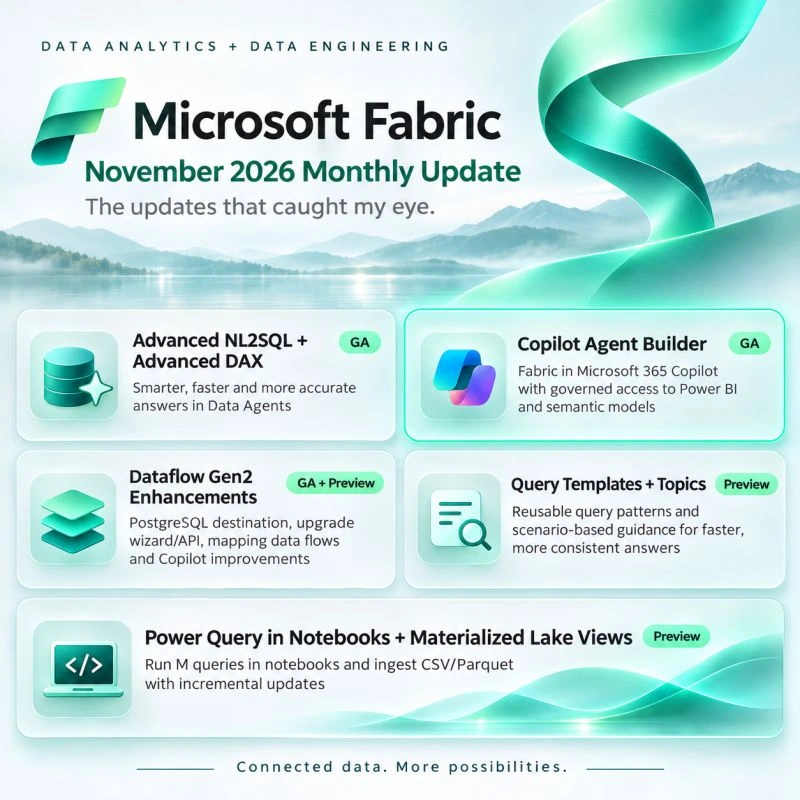
What caught my attention in November was how Fabric handles two familiar problems: a source record that changes after it has been loaded, and a business question that can be interpreted more than one way. Materialized Lake Views tackle the first. Fabric Data Agents are getting better at the second.
My favourite update: Materialized Lake Views
Materialized Lake Views (MLVs) already let you define a Lakehouse transformation in SQL, track its dependencies and keep the results in a precomputed Delta table. That’s useful in a medallion architecture: a Silver view can clean the incoming records, and a Gold view can aggregate them for reporting. Previously, incremental refresh was most effective for appended records. An update or delete could require a full refresh.
November introduces two preview capabilities I’m especially interested in. First, an MLV can read CSV and Parquet files directly from OneLake, bringing file ingestion into the transformation definition. Second, for eligible transformations, unique-key refresh hints and Delta Change Data Feed allow updates and deletes to be processed incrementally.
Think of a sales order whose amount is corrected after month-end. The Gold total needs to reflect the correction, even though no new order was placed. That’s the scenario I’d test first: change the source amount, refresh the views and check both the revised total and how much data was reprocessed. It’s a practical way to see where these enhancements can reduce custom orchestration.
Data agents and Microsoft 365 Copilot
Advanced NL2SQL and NL2DAX are now generally available in Fabric Data Agents. When a question is ambiguous, the agent can inspect the data, test its interpretation and validate the query before answering. That matters for a question like “Which products have the highest margin?” where the answer depends on how the semantic model defines margin.
Integration with Microsoft 365 Copilot Agent Builder also makes Power BI reports and semantic models available through agents while respecting existing access permissions. In preview, reusable query templates and topics give authors more control over recurring questions and the instructions that apply to them.
Dataflow Gen2 and Power Query
Dataflow Gen2 adds PostgreSQL as a destination and provides migration tools for teams moving from Gen1. Copilot-assisted transformations are in preview, as is Power Query in notebooks. For someone who works across Power BI and Fabric, I’m interested in being able to bring familiar M transformations into a notebook workflow.
The first feature I want to explore in an end-to-end Lakehouse is still incremental MLV refresh. A pipeline that handles corrections and deletes reliably is a better foundation for both a dashboard and an agent answering questions about its numbers.
What incremental refresh actually needs
A materialized result stores the output of a transformation so that downstream work can reuse it. Incremental refresh tries to update that result from changes instead of recalculating everything. Microsoft’s optimal refresh documentation distinguishes three outcomes: skip a refresh, process changes incrementally, or recompute the full result.
Change Data Feed must be enabled on the referenced source tables for incremental processing. Updates and deletes also require a compatible refresh hint that identifies rows. Enabling CDF alone does not make every transformation incremental: unsupported expressions, source characteristics or the estimated cost can lead to a full refresh. I would inspect the actual run behavior rather than infer it from the setting.
For a learning exercise, start with three orders totaling 600. Correct one order from 200 to 250, then delete a different order worth 100. The expected total becomes 550. Check the detailed rows as well as the aggregate after each refresh. This simple example helps reveal double counting, missed deletes and incorrect keys before trying the same pattern on a larger Lakehouse.
Teaching a data agent the business meaning
“Sales” can mean booked orders, invoiced revenue or payments received. “This month” can mean calendar month or fiscal period. Those definitions need to be explicit before evaluating an agent’s answer. A useful test set includes a straightforward question, an ambiguous question and a question the current user should not be able to answer from restricted data.
My suggested approach is to compare each response with a trusted SQL query or model measure, using the same filters and reporting period. Record the expected result and the explanation of the metric. An answer that sounds natural is not sufficient evidence of correctness. This is why I see data preparation, semantic modeling and agent evaluation as connected parts of the same analytics workflow.